

JSON-LD in the RAG Era: The VIP Pass to the Context Window
Schema types like FAQPage and Organization are parsed separately from the noisy DOM and injected directly as pre-structured context into LLM processing pipelines. JSON-LD is not just an SEO signal — it is a direct mechanism for inserting pre-formatted facts into the context window.
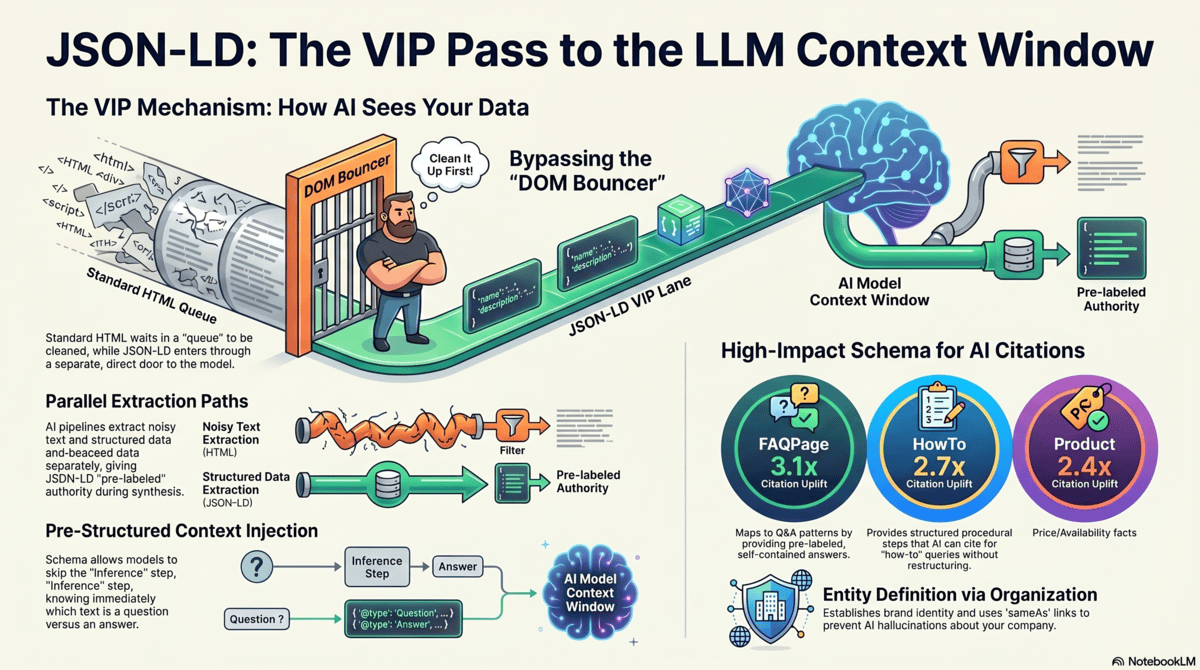
How AI parsers treat JSON-LD differently
When Readability.js or Jina.ai reader processes a web page, it strips navigation, sidebars, and boilerplate — but it treats <script type="application/ld+json"> blocks differently from everything else. JSON-LD is not HTML content. It is structured machine-readable data. Most ingestion pipelines parse it separately and pass it as a distinct input stream.
This means your JSON-LD Schema does not compete with the DOM noise that Readability.js is trying to filter. It bypasses the filter. The Schema's structured key-value pairs arrive in the processing pipeline as a clean, pre-labeled data object — not as raw text that the model must parse for meaning.
For a FAQPage schema, this means the model receives your questions and answers as structured pairs: ``. The model knows immediately which text is a question and which is an answer, without inferring structure from the surrounding HTML. This dramatically reduces the processing overhead required to extract the answer and cite the source.
The VIP lane analogy
Think of the DOM-to-vector pipeline as a nightclub queue. Regular HTML content waits in line, gets evaluated by the Readability.js bouncer, and may or may not make it inside. JSON-LD Schema has a VIP pass — it enters through a separate door, bypassing the queue and the bouncer, and goes directly to the context window.
Pre-structured context injection
The technical mechanism: when an AI pipeline processes a URL for RAG indexing, it typically runs two parallel extraction paths. The first path is DOM text extraction — clean the HTML, chunk the text, embed the chunks. The second path is structured data extraction — parse JSON-LD, extract entity-property-value triples, store them as structured facts.
During synthesis, structured facts have a retrieval advantage because they arrive pre-labeled. A JSON-LD FAQPage answer is tagged as acceptedAnswer — the model knows this is a confident, authoritative answer to a specific question. That label increases the chunk's weight in synthesis for FAQ-type queries.
The schema types that matter most in RAG
Not all Schema types are equal in the RAG context. These are the highest-impact types ranked by citation probability improvement:
FAQPage: the highest-ROI Schema for GEO
FAQPage Schema creates a direct mapping between questions users ask and the answers your page provides. When an LLM receives a retrieval context that includes a FAQPage block, it can identify the specific Q&A pair relevant to the user's query and cite it with high confidence — without needing to extract the answer from noisy prose.
The key requirement for GEO-effective FAQPage: each answer must be self-contained and answer-first. Bad: "Yes, we do offer this." Good: "RankAsAnswer offers FAQPage Schema auto-generation for all pages, available on Pro plan and above, with one-click deployment to your site's <head> section."
Target 5–8 questions per page. Fewer than 3 provides minimal coverage; more than 12 dilutes the Schema with low-priority questions. Questions should match the actual phrasing users type into AI models — conversational, specific, with intent words.
Organization schema for entity definition
Organization Schema is the foundational entity definition block. It establishes your brand as a named entity with specific properties: legal name, URL, logo, founding year, description, social profiles, and sameAs links to authoritative entity disambiguators (Wikidata, Crunchbase, LinkedIn).
The sameAs property is particularly powerful: it creates explicit links between your domain's entity representation and external knowledge graph nodes. When Google's LLM processes your Organization Schema, the sameAs link to your Wikidata entry connects your domain to Wikidata's full entity record — dramatically reducing hallucination risk and increasing trust prior.
HowTo schema for procedural queries
HowTo Schema maps directly to the second most common AI query type after direct questions: procedural queries ("how to configure X," "steps to implement Y"). Each HowToStep provides a labeled step with a name and text — pre-structured process content that the model can cite as numbered steps without restructuring.
Each step's text must be an independent, actionable instruction. Do not use step text as a pointer to further content ("see the next section"). The step text is what gets cited — make each step complete and verifiable on its own.
Automating Schema with RankAsAnswer
RankAsAnswer analyzes your page content and generates GEO-optimized JSON-LD Schema blocks automatically. For FAQPage Schema, it extracts your heading structure, identifies implied questions, generates clean answer text, and outputs the complete JSON-LD block ready for deployment in your page's <head>. The entire process takes under 60 seconds per page.
Generate Schema automatically RankAsAnswer generates FAQPage, HowTo, and Organization Schema in under 60 seconds. Entity clustering How to build topical authority through entity overlap, not PageRank.
Continue reading
All articlesGEO Tracking: How to Monitor Your AI Citation Performance Over Time
Learn how to track whether AI answer engines are actually citing your content. Covers manual monitoring, automated tracking tools, and the metrics that matter for measuring GEO success.
How to Choose a Generative Engine Optimization Platform: Buyer's Decision Framework
Not all GEO platforms are built the same. Use this framework to evaluate generative engine optimization software on the criteria that actually determine whether it improves your AI citation performance.
GEO Checker Software: Should You Build Your Own or Buy a Platform?
Should you build an internal GEO checker or buy existing software? A cost-benefit analysis covering build effort, maintenance burden, feature gaps, and when each approach makes sense.
Generative Engine Optimization Techniques: From Foundational to Advanced
A comprehensive reference of GEO techniques organized by difficulty level. Master foundational best practices first, then layer advanced techniques for maximum AI citation probability.
The GEO Tooling Stack: Best Tools for AI Search Optimization in 2026
Compare the best Generative Engine Optimization tools for 2026. From citation tracking to Schema generators, here is the complete GEO tooling stack for teams serious about AI search visibility.
Best Generative Engine Optimization Tools in 2026: The Complete Comparison
A rigorous comparison of the best GEO tools available in 2026. Covering audit platforms, Schema generators, citation trackers, and content intelligence tools — what each does well and where each falls short.